How to Check NECO Results: Official 2026 Step-by-Step Guide
If you are waiting for your NECO result, the safest way to check it is through the official NECO Results Portal using your examination details and a valid result-checking token. A small mistake in the examination year, examination type, registration number, or token can prevent the result from displaying correctly.
This guide explains how to check NECO results online, what you need before starting, what to do when the portal rejects your details, and what your result means for the next stage of your admission process.
What You Need Before Checking Your NECO Result
Before opening the results portal, keep your examination information nearby. Having these details available makes the process easier and reduces the chance of entering incorrect information.
- Your NECO examination or registration number.
- Your examination year.
- Your examination type, such as SSCE Internal or SSCE External.
- A valid NECO result-checking token.
- A stable internet connection and a phone, tablet, or computer with a modern web browser.
You should also confirm that the examination details on your registration documents match the examination you are trying to check. Selecting the wrong examination year or examination type can cause a valid token to be rejected.
How to Check NECO Results Online
Use the official NECO Results Portal when checking your result. Avoid websites or individuals claiming that they can retrieve, change, upgrade, or release a result outside the official process.
Visit the official results portal at results.neco.gov.ng.
- Open the official portal: Visit the NECO Results Portal using your phone or computer.
- Select the examination year: Choose the year in which you took the examination. For a 2026 result, select 2026.
- Select the examination type: Choose the examination category that matches your registration, such as SSCE Internal or SSCE External.
- Enter your result token: Carefully type the valid token into the appropriate field.
- Enter your registration number: Enter the registration number exactly as it appears on your examination documents.
- Submit the form: Select the option to check your result and wait for the portal to process your details.
Take your time when entering the information. If the result does not appear, check the examination year, examination type, registration number, and token before attempting the process again.
How to Get a NECO Result-Checking Token
A valid result-checking token is required to retrieve a NECO result through the online results portal. If you do not already have one, use the token-purchase option provided through the official NECO results service.
Keep your token and payment information secure after purchase. Do not post the token publicly or send it to strangers who claim they need it to help you check your result.
If a token appears not to work, do not immediately purchase another one. First confirm that the token was entered correctly and that the examination year, examination type, and registration number all correspond to the same examination record.
What to Do After Your NECO Result Appears
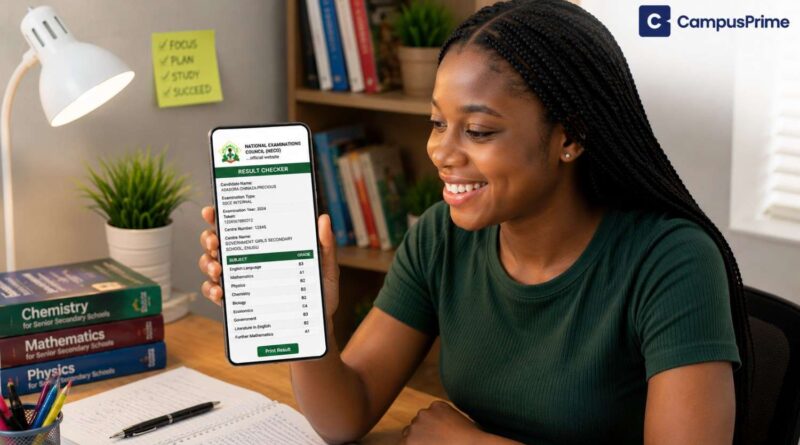
Do not close the result page immediately after seeing your grades. Check the displayed information carefully and make sure the examination details and candidate information are correct.
Save a digital copy of your result where possible. Keeping a copy on your phone, computer, or cloud storage can save time when you later need to provide your O’Level result for admission, scholarship, clearance, or another official application.
Keep in mind that institutions may have different requirements for submitting O’Level results. Some may request a particular printout or verification document, while others may require candidates to upload their results through a specific admission portal. Always follow the instructions published by the institution concerned.
Common Problems When Checking NECO Results
A failed result check does not automatically mean that your result is unavailable. Incorrect examination details, an invalid token, internet problems, and temporary portal issues can all prevent a result from loading.
Invalid Token Error
If the portal rejects your token, compare every character with the token you purchased. Be particularly careful with characters that can easily be confused when typed or read from a receipt.
Also confirm that you selected the correct examination year and examination type. If the token and examination information do not correspond, the portal may not retrieve the result.
NECO Result Portal Not Loading
A slow or temporarily unavailable website does not necessarily mean there is a problem with your result. If the page takes too long to respond, avoid repeatedly submitting the same request.
Check your internet connection, refresh the page after a short interval, or try again later. You can also try another browser or device if the problem continues.
Result Not Showing After Submission
Review the information you entered before taking any further action. Check the examination year, examination type, registration number, and token carefully.
If all the details are correct and the problem continues, seek assistance through an official NECO channel or your school. Avoid paying an unofficial agent who promises to unlock or alter a result.
Withheld or Outstanding Result
If your result appears as withheld or outstanding, do not treat the message as an ordinary login error. The status may require further administrative clarification.
Keep your examination documents and payment records and contact your school or the appropriate NECO office for guidance. Do not repeatedly purchase tokens in an attempt to change the result status.
What Your NECO Result Means for Admission
Checking your grades is only the beginning. If you intend to use the result for tertiary admission, compare the subjects and grades you obtained with the O’Level requirements for your chosen programme.
A candidate may have a good overall result but still need to confirm whether the required subjects and grades are available for the specific course being applied for. Admission requirements can also differ between institutions and programmes.
After confirming your grades, make sure the correct O’Level information is submitted through the appropriate admission process. If your O’Level result is not appearing on JAMB CAPS after the required upload, you can review our guide on JAMB CAPS Not Showing O’Level Results.
You can also review our JAMB CAPS Portal 2026 Activation and Services guide if you need help understanding the relevant JAMB profile and admission procedures.
NECO Result Checking Mistakes to Avoid
Most result-checking problems can be avoided by verifying your information before submitting the form. Avoid these common mistakes:
- Using an unofficial result-checking website when the official NECO portal is available.
- Selecting the wrong examination year.
- Selecting the wrong examination type.
- Entering an incorrect registration number.
- Typing the result token incorrectly.
- Sharing your token with people you do not trust.
- Buying another token immediately after one failed attempt without checking the information first.
- Failing to save a copy of the result after successfully viewing it.
What to Do If There Is a Problem With Your NECO Result
If you believe there is an issue with your result or the result status does not match your expectations, use official NECO procedures for clarification.
Do not pay individuals who claim they can change grades, release withheld results, upgrade scores, or manipulate examination records. Such promises should be treated with caution.
NECO also provides an official e-Verify service for result verification. If a university, employer, scholarship provider, or another organisation requests formal verification, check the specific document or verification procedure required before submitting your result.
FAQs on How to Check NECO Results
Where can I check my NECO result?
You can check your NECO result through the official NECO Results Portal at results.neco.gov.ng.
Do I need a token to check my NECO result?
Yes. A valid result-checking token is required when retrieving your result through the online NECO results service. If you do not have one, use the official token-purchase option available through the results service.
What should I do if my NECO token is rejected?
First check the token carefully and confirm that the examination year, examination type, and registration number are correct. If the information is accurate and the token is still rejected, seek assistance through an official NECO channel instead of purchasing several tokens unnecessarily.
Can I check my NECO result without my registration number?
The result-checking process requires your examination information, including your registration number. If you have misplaced your examination documents, contact your school or NECO through an official channel for guidance.
What if my NECO result is withheld?
A withheld or outstanding result should not be treated as a normal portal error. Keep your examination records and seek clarification from your school or an official NECO channel. Avoid anyone who claims they can privately release or alter the result.
Should I save my NECO result after checking it?
Yes. Save a secure digital copy for future admission, clearance, scholarship, or verification purposes. Also check the requirements of the institution you are applying to because the type of result document required can vary.
Conclusion
Checking your NECO result is straightforward when you use the official results portal and enter the correct examination information. Keep your registration number and result token available, select the correct examination year and examination type, and review your details carefully before submitting the form.
After your result appears, save a copy and compare your subjects and grades with the O’Level requirements for your intended course. If you encounter an error, verify your details before purchasing another token or seeking help from an unofficial agent.
For more admission guidance and Nigerian education updates, visit the CampusPrime Homepage.
The CampusPrime Update
Join thousands of students getting the latest verified university news, Post-UTME forms, scholarship opportunities, and admission guides straight to their inbox.
✨ 100% Free. No spam, ever.