
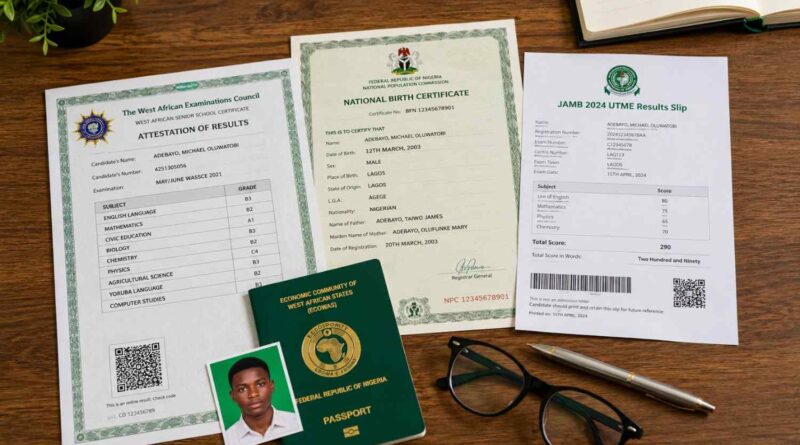
UNN Post UTME Registration Documents 2026/2027
Preparing your UNN Post UTME registration documents before the application period can prevent avoidable delays during screening. Candidates often focus on completing the online form but overlook simple issues such as inconsistent names, unclear documents, missing results or incomplete records.
The safest approach is to prepare your documents in advance and compare them with the requirements published for the current University of Nigeria, Nsukka (UNN) admission exercise. Requirements can change between admission sessions, so an old checklist should not replace the latest official instruction.
UNN Post UTME Registration Documents Checklist
The documents required for UNN Post UTME registration or subsequent screening depend on the instructions issued for the particular admission exercise. The following records are among the documents candidates should prepare and verify before beginning their application.
O’Level Result
Your WAEC, NECO or NABTEB result is one of the key academic records used during the admission process. Before registration, check that your result clearly shows your subjects, grades and personal details.
If you are using an awaiting result, do not rely on requirements from an earlier admission session. Check the current UNN screening instructions to confirm whether awaiting results are accepted and when candidates must provide the final result.
Candidates who have already obtained their O’Level result should also check whether the result information has been correctly uploaded to their JAMB profile where required. For additional preparation, see our UNN O’Level Clearance Guide.
JAMB Registration and Result Details
Keep your JAMB registration number and result information available before starting the UNN application. These details help the university identify your admission record and should match the information attached to your JAMB profile.
If you need the official version of your result slip, you can follow our guide on how to print the JAMB Original Result Slip.
Birth Certificate or Age Declaration
A birth certificate or age declaration may be required when personal information needs to be verified. Check the date of birth carefully against the information on your JAMB profile and other official records.
If the dates do not agree, do not edit the document yourself or enter a different date simply to make the records match. Identify which record contains the error and follow the appropriate correction procedure before screening.
Local Government Identification or Related Document
Depending on the current UNN admission or screening requirements, candidates may be asked to provide evidence relating to their Local Government Area or state of origin.
If this document appears on the current checklist, obtain it from the appropriate authority and keep a clear copy ready. Do not obtain unnecessary documents solely because they appeared on an older UNN admission checklist.
First School Leaving Certificate or Testimonial
Some admission or clearance procedures may request evidence of basic education. If UNN lists a First School Leaving Certificate, testimonial or similar document for the current exercise, prepare it before completing the application.
Where the document is not listed in the current instructions, candidates should avoid assuming that it is mandatory for every Post UTME application.
Passport Photograph
A recent passport photograph may be required for the online application or screening documents. Use a clear photograph that follows the specifications displayed on the UNN application portal.
Before uploading the image, check its size, format, background and overall quality. A photograph that looks acceptable on a phone may still fail an upload requirement if it does not meet the portal’s technical specifications.
How to Check Your UNN Post UTME Documents Before Submission
Start by comparing your full name, date of birth and JAMB registration number across your available records. Pay particular attention to spelling differences, missing names, misplaced names and incorrect dates.
Next, check your O’Level subjects and grades against the original result. A simple data-entry mistake can become difficult to explain later if the submitted information does not match the supporting document.
Review every uploaded file before submission. Make sure the document belongs to you, the text is readable and the image or PDF is not damaged or unnecessarily compressed.
If you discover an error, do not create another application or modify an official document without guidance. First determine whether the UNN portal provides an editing option or whether you need assistance from the university or another institution responsible for the affected record.
It is also useful to keep a digital folder containing your application documents. Save the original files, uploaded copies, payment evidence and acknowledgement documents in one secure location. Keep physical copies of important records where they may be required during later screening or clearance.
Common Document Problems That Can Delay UNN Screening
Document problems are not always caused by missing certificates. In many cases, the problem is an inconsistency between records or an incorrectly uploaded file.
- Different names: A name may appear differently on your JAMB profile and academic documents.
- Incorrect date of birth: A wrong date entered during registration can create verification concerns.
- Unclear documents: Blurred scans or photographs may make important information difficult to verify.
- Wrong document: Candidates sometimes upload a file belonging to another application or an outdated document.
- Incomplete result information: Missing subjects or grades can create questions during verification.
- Lost application records: Candidates who fail to save their acknowledgement details may struggle to retrieve information later.
The practical lesson is simple: do not wait until the screening date to discover a problem with your documents. Reviewing your records before submission gives you more time to identify the correct institution or procedure for resolving an issue.
UNN Post UTME Registration Documents FAQs
What Documents Are Needed for UNN Post UTME Registration?
Prepare your O’Level result, JAMB registration and result details, passport photograph and relevant identification documents. Additional documents may apply depending on the current UNN admission exercise, so candidates should follow the latest screening instructions issued by the university.
Can I Apply to UNN With an Awaiting O’Level Result?
This depends on the requirements for the particular admission exercise. Candidates using awaiting results should check the current UNN screening notice and confirm when the final result must be provided or uploaded.
Do My Names Have to Match on My UNN Screening Documents?
Your personal information should be consistent across your JAMB profile, O’Level result and other relevant admission records. If you discover a discrepancy, identify the affected record and follow the appropriate official correction procedure before screening.
Do I Need My Original JAMB Result Slip for UNN?
Keep your JAMB result information and the appropriate result slip available. If UNN specifically requests the original JAMB result slip during screening or clearance, provide it according to the university’s instructions.
Should I Keep Physical Copies of My UNN Post UTME Documents?
Yes. Although much of the registration process may take place online, keeping physical and digital copies of important documents is a useful precaution. You may need them during screening, verification or subsequent clearance.
What Should I Do If I Notice an Error After Submitting My UNN Application?
Do not immediately submit another application. First check whether the UNN portal provides an approved correction option. If the field cannot be edited, contact the appropriate university support or admissions channel and explain the specific error before taking further action.
Where Can I Check the Latest UNN Screening Requirements?
Use the current UNN admission and screening instructions as the primary reference for your application. Requirements can change between admission sessions, so candidates should not rely solely on screenshots, old checklists or information shared in unofficial groups.
Final Checklist for UNN Post UTME Registration
Getting your UNN Post UTME registration documents ready before registration gives you time to identify problems before they affect your application. Start with your O’Level result and JAMB records, then check your identification documents, passport photograph and any additional documents listed in the current screening instructions.
- Check your full name across your important records.
- Confirm your date of birth.
- Keep your JAMB registration number available.
- Verify your O’Level subjects and grades.
- Check every uploaded document for clarity and accuracy.
- Use a passport photograph that meets the portal requirements.
- Save your application and payment records.
- Keep both digital and physical copies of important documents.
- Review the latest UNN instructions before submitting your application.
The most important step is to compare your documents with the requirements for the current admission exercise rather than assuming that an older UNN checklist still applies. If two official records contain conflicting information, resolve the discrepancy through the appropriate channel before screening whenever possible.
For related admission information and student guides, visit the CampusPrime Homepage.
The CampusPrime Update
Join thousands of students getting the latest verified university news, Post-UTME forms, scholarship opportunities, and admission guides straight to their inbox.
✨ 100% Free. No spam, ever.